Fedora Core 18 chroot install on existing LVM/dmraid
Needless to say Fedora 18’s Anaconda installer is quite… buggy and unable to reuse existing partitions. Add some more bugs in the kickstart support for existing raid arrays, and you end up with an totally uninstallable distro on non standard configuration.
Boot the livecd version, and (create if needed) mount, ready the target partitions.
Mount the root partition
Note: Grub2 with lvm & dmraid will need some more space than the usual first 63 blocks. Check the beginning of your first partition and move the beginning if needed (fdisk, expert, b, 2048 for example). Note that operation will destroy the first partition. (supposely /boot for careful people)
yum --installroot=/mnt/target --releasever 18 group install "Minimal Install"
From this point, you have all the packages for a working system, except it can’t boot (but valid for chroot or containers environment).
To make your system boot, add a kernel image and grub, lvm and mdadm tools.
It is base rpm support, so you’ll also need yum. Add the yum_langpacks plugin if you’re going to support another locale.
yum --installroot=/mnt/target --releasever 18 install yum kernel grub mdadm lvm2 yum_langpacks
Copy the current live fstab for base, and edit it according to your configuration
cp /etc/fstab /mnt/target/etc/fstab

vi /mnt/target/etc/fstab
Ready your chroot environment, and chroot in your new distro root
for i in dev sys proc; do mount -o bind /$i /mnt/target/$i; done

chroot /mnt/target
Then make the minimal changes and LVM cache generation/RAID configuration to bring a bootable configuration.
passwd root

vi /etc/mdadm.conf

vgscan

grub-mkconfig -o /boot/grub2/grub.conf

kernelver=`rpm -qa kernel | sed 's/kernel-//'`

dracut /boot/initramfs-${kernelver}.img ${kernelver}
For selinux, you may also want to disable selinux, at least for 1st boot (files are not labeled).
sed -i 's/SELINUX=enforcing/SELINUX=disabled/' /etc/sysconfig/selinux

touch /.autorelabel
Don’t forget to update the bootloader of your drives if the current one isn’t grub 2.0 or misses core img with lvm/dm support
grub2-install /dev/sda
Now your system is ready to boot.
exit; umount /mnt/target/*; umount /mnt/target; reboot
At grub prompt, if you didn’t disable selinux yet, append selinux=0 to the kernel command line.
Your system should be now in console mode.
Note: Keyboard is using “us” keymap.
You may now want to configure locale, hostname, network, keyboard, time.
Due to dbus requirements, locale changes through *ctl tools can’t be done earlier.
Install support for any other locale (ex: fr)
yum langinstall fr
In no particular order, you may want to use these tools and update configuration files (see the according man pages).
system-config-date

system-config-keyboard

/etc/vconsole.conf

/etc/locale.conf

localectl

hostnamectl
You might be stuck with localectl not setting up correctly the Xorg keymap (used by display manager lightdm or xfce).
You’ll need to use the full keymap model syntax.
Example for the FR locale:
set-x11-keymap fr pc105 oss
Example localectl output on a fully configured system:
   System Locale: LANG=fr_FR.UTF-8

       VC Keymap: fr

      X11 Layout: fr

       X11 Model: pc105

     X11 Variant: oss
You can also force yum to install some other locales support by editing the langpack plugin config:
/etc/yum/pluginconf.d/langpacks.conf
From here, everything should be set up. If you want a desktop, install the whole group.
groups can be listed:
yum group list
Ex: for a full MATE desktop (display manager will be lightdm)
yum group install "MATE Desktop"

systemctl restart lightdm
Done 🙂
SSD acceleration support on Linux

Block caching strategies
Read cache only (One way, write-around)
Changed blocks are written only and directly to the cached device. The SSD only invalidates its entry and fetch written data when a read request occurs. Only benefits for high read/write ratios.
Read and write cache (Full cache, write-through)
Changed blocks are written to both devices.
Read cache with buffered writes (write-back)
Blocks are written to both devices but delayed on the cached device, allowing writes reordering and optimizations.
Block caching modules
bcache
Linux kernel block layer cache, now mainstream.
flashcache
Facebook’s own contribution module to disk acceleration.
dm
The kernel device mapper. It is not intented to act as block caching/accelerator, but a trick makes SSD usable (or any other fast device) for acceleration purposes.
In fact, the point here is not to designate a cache (fast) device, but the slow ones: This is the write-mostly option that was primary intented to flag network block devices.
Features
I/O bottleneck redirection
When using a block cache for a accelerating a pool of devices, the cache device might not be able to withstand the total amount of requested I/O and then have the reverse effect. Detecting I/O bottlenecks allows overriding the cache device and directing I/O directly to the backend devices. A hard disk can withstand a max of 200 IOPS, where a SLC SSD handles 5000 IOPS. Probably effectless with a 25 disks less pool then.
TRIM
TRIM/discard support allows the filesystem to flag the physical block as no longer used. Otherwise, the device still see unallocated blocks as in use, and will experience performance decrease and write amplification problem as the block usage grows.
TRIM over mapper or RAID
This is the ability of passing trim commands to virtual devices, which then needs to issue the right/translated TRIM commands as well.
Write amplification
If the write amplification will happen by design, whether the device handles TRIM or not.
| bcache | flashcache | dm (mostly-write) |
|
| mainstream (kernel) | NO | NO | YES |
| cache size/device size ratio |
<=1.0 | <=1.0 | 1.0 |
| write-around strategy |
NO | YES | YES |
| write-through strategy | YES | YES | NO |
| write-back strategy | YES | YES | NO |
| I/O bottleneck redirection |
YES | NO | NO |
| TRIM support | YES | NO
(Work In Progress) |
YES (upper layer passthrough) |
| RAID/DM TRIM support | YES (2.6.37) |
||
| write amplification issue | NO | YES (lack of trim support from upper layer) |
YES (caused by 1:1 mirroring) |
cellspacing=”2″ height=”145″ width=”1135″>
<tbody>
<tr>
<td style=”vertical-align: top; font-weight: bold;”><br>
</td>
<td
style=”vertical-align: top; font-weight: bold; background-color: rgb(204, 204, 204);”>directly
attached<br>
</td>
<td
style=”vertical-align: top; background-color: rgb(204, 204, 204);”><strong>LVM</strong><br>
</td>
<td
style=”vertical-align: top; background-color: rgb(204, 204, 204);”><strong>DM</strong><br>
</td>
<td
style=”vertical-align: top; background-color: rgb(204, 204, 204);”><strong>LVM+DM</strong></td>
</tr>
<tr>
<td
style=”vertical-align: top; background-color: rgb(204, 204, 204);”><strong>mainstream</strong>
(kernel)</td>
<td style=”vertical-align: top;”><br>
</td>
<td style=”vertical-align: top;”>NO</td>
<td style=”vertical-align: top;”>NO</td>
<td style=”vertical-align: top;”>YES</td>
</tr>
<tr>
<td
style=”vertical-align: top; background-color: rgb(204, 204, 204);”><strong>cache
size/device size ratio</strong></td>
<td style=”vertical-align: top;”><br>
</td>
<td style=”vertical-align: top;”><=1</td>
<td style=”vertical-align: top;”><=1</td>
<td style=”vertical-align: top;”>1</td>
</tr>
<tr>
<td
style=”vertical-align: top; background-color: rgb(204, 204, 204);”><strong>write-around</strong>
strategy<strong>
</strong></td>
<td style=”vertical-align: top;”><br>
</td>
<td
style=”vertical-align: top; background-color: rgb(255, 255, 255);”>NO</td>
<td
style=”vertical-align: top; background-color: rgb(255, 255, 255);”>YES</td>
<td
style=”vertical-align: top; background-color: rgb(255, 255, 255);”>YES</td>
</tr>
<tr>
<td
style=”vertical-align: top; background-color: rgb(204, 204, 204);”><strong>write-through</strong>
strategy</td>
<td style=”vertical-align: top;”><br>
</td>
<td
style=”vertical-align: top; background-color: rgb(255, 255, 255);”>YES</td>
<td
style=”vertical-align: top; background-color: rgb(255, 255, 255);”>YES</td>
<td
style=”vertical-align: top; background-color: rgb(255, 255, 255);”>NO</td>
</tr>
<tr>
<td
style=”vertical-align: top; background-color: rgb(204, 204, 204);”><strong>write-back</strong>
strategy</td>
<td style=”vertical-align: top;”><br>
</td>
<td
style=”vertical-align: top; background-color: rgb(255, 255, 255);”>YES</td>
<td
style=”vertical-align: top; background-color: rgb(255, 255, 255);”>YES</td>
<td
style=”vertical-align: top; background-color: rgb(255, 255, 255);”>NO</td>
</tr>
<tr>
<td
style=”vertical-align: top; background-color: rgb(204, 204, 204);”><strong>overcommiting</strong><strong>
</strong></td>
<td style=”vertical-align: top;”><br>
</td>
<td
style=”vertical-align: top; background-color: rgb(255, 255, 255);”>NO
(W.I.P.)</td>
<td
style=”vertical-align: top; background-color: rgb(255, 255, 255);”>NO</td>
<td
style=”vertical-align: top; background-color: rgb(255, 255, 255);”>NO</td>
</tr>
<tr>
<td
style=”vertical-align: top; background-color: rgb(204, 204, 204);”><strong>TRIM</strong>
support</td>
<td style=”vertical-align: top;”><br>
</td>
<td
style=”vertical-align: top; background-color: rgb(255, 255, 255);”>YES</td>
<td
style=”vertical-align: top; background-color: rgb(255, 255, 255);”>NO
(W.I.P.)</td>
<td
style=”vertical-align: top; background-color: rgb(255, 255, 255);”>YES
(upper layer passthrough)</td>
</tr>
<tr>
<td
style=”vertical-align: top; background-color: rgb(204, 204, 204);”><strong>RAID/DM
TRIM </strong>support</td>
<td style=”vertical-align: top;”><br>
</td>
<td
style=”vertical-align: top; background-color: rgb(255, 255, 255);”><br>
</td>
<td
style=”vertical-align: top; background-color: rgb(255, 255, 255);”><br>
</td>
<td
style=”vertical-align: top; background-color: rgb(255, 255, 255);”>YES
(2.6.36)</td>
</tr>
<tr>
<td
style=”vertical-align: top; background-color: rgb(204, 204, 204);”><span
style=”font-weight: bold;”>write amplification </span>issue</td>
<td style=”vertical-align: top;”><br>
</td>
<td
style=”vertical-align: top; background-color: rgb(255, 255, 255);”>NO</td>
<td
style=”vertical-align: top; background-color: rgb(255, 255, 255);”>YES
(without trim support from upper layer)</td>
<td
style=”vertical-align: top; background-color: rgb(255, 255, 255);”>YES
(caused by 1:1 mirror)</td>
</tr>
</tbody>
</table>
Centos on BrandZ lx zones benchmarkedCentos on lx BrandZ zones benchmarkedCentos on BrandZ lx zones benchmarked
With Solaris 11, Sun/Oracle dropped “lx brandz” zones, the linux guest support for the solaris containers technology. Some doesn’t even knew this was existing. The perspectives of using ZFS’s capabilities for provisioning was really exciting. But that project wasn’t ready for production setups, and support was only provided for linux 2.4 kernels (although there was ways to run a 2.6.x), and with incomplete features.
I ran some performance tests few months ago. Let’s bring some figures explaining the Solaris 11 decision.

As shown above, brandz zones are full zones providing a syscall translation layer to the guest os. The linux guest is instanciated by running its init process, like a “user mode linux” system would be.
Overhead estimation
I used BYTE UNIX Benchmarks (Version 5.1.2) to run a set of micro benchmarks involving syscalls.
The brandz zone was set up with a Centos 5.4/i386 distrib, minimal install.
OpenSolaris Host details
| System: | opensolaris: OpenSolaris Development snv_134 X86 | |
| OS: | SunOS — 5.11 — snv_134 | |
| Machine: | i86pc: i86pc | |
| Language: | en_US.utf8 (charmap=, collate=) | |
| CPUs: | no details available | |
| Uptime: | 5:30pm up 1:08, 1 user, load average: 0.17, 3.21, 3.86; runlevel | |
Most Solaris details were not detected, but this is the global zone for the following brandz zone result.
Every zone was reduced to a minimal set of processes and brought to runlevel 3 (or single-user milestone).
Linux Guest details (Centos 5.4 i386)
| System: |
centos: GNU/Linux | |
| OS: | GNU/Linux — 2.6.18 — BrandZ fake linux | |
| Machine: | i686: i386 | |
| Language: | en_US.utf8 (charmap=”UTF-8″, collate=”UTF-8″) | |
| CPUs: | 0: | AMD Athlon(tm) 64 X2 Dual Core Processor 4800+ (0.0 bogomips) Hyper-Threading, x86-64, MMX, Physical Address Ext, SYSENTER/SYSEXIT, SYSCALL/SYSRET |
| 1: | AMD Athlon(tm) 64 X2 Dual Core Processor 4800+ (0.0 bogomips) Hyper-Threading, x86-64, MMX, Physical Address Ext, SYSENTER/SYSEXIT, SYSCALL/SYSRET |
|
| Uptime: | 10:28:23 up 1 min, 1 user, load average: 0.16, 0.58, 0.34; runlevel 3 | |
The following table shows score for both zones, and relative performance.
| CentOS Score | Native Score | Difference | |||||
| 1 thread | 2 // | 1 // | 2 // | 1// | 2// | ||
| Execl Throughput | 82.00 | 99.30 | 204.90 | 230.20 | lps | -60,0% | -56,9% |
| File Copy 1024 bufsize 2000 maxblocks | 31784.90 | 45180.30 | 40514.50 | 54613.10 | K Bps | -21,5% | -17,3% |
| File Copy 256 bufsize 500 maxblocks | 8273.00 | 11576.50 | 10601.20 | 13860.50 | K Bps | -22,0% | -16,5% |
| File Copy 4096 bufsize 8000 maxblocks | 122401.90 | 172447.90 | 149167.70 | 204321.90 | K Bps | -17,9% | -15,6% |
| Pipe Throughput | 58154.50 | 80420.50 | 89803.10 | 117446.00 | lps | -35,2% | -31,5% |
| Pipe-based Context Switching | 3773.30 | 6809.80 | 3838.50 | 7238.90 | lps | -1,7% | -5,9% |
| Process Creation | 134.20 | 151.90 | 263.30 | 301.20 | lps | -49,0% | -49,6% |
| Shell Scripts (1 concurrent) | 210.00 | 238.70 | 432.50 | 482.00 | lpm | -51,4% | -50,5% |
| Shell Scripts (16 concurrent) | 15.80 | 14.90 | 32.40 | 33.00 | lpm | -51,2% | -54,8% |
| Shell Scripts (8 concurrent) | 32.20 | 30.50 | 66.10 | 67.50 | lpm | -51,3% | -54,8% |
| System Call Overhead | 60471.00 | 81388.60 | 58388.50 | 73052.70 | lps | 3,6% | 11,4% |
Running syscalls micro benchmarks is likely to draw the worst case, and we can see an increasing overhead (up to 11.4%) when running multiple threads. On the other figures, we can see a real performance decrease for I/O where increasing buffer size doesn’t really help: This means the syscall overhead only has little impact in the overall performance decrease and there’s probably a 15% performance hit from another cause. Processes spawning performance is really bad, and this is also probably due to the fact a conversion is made before attaching them to the Solaris kernel (remember we do not run any linux kernel, just its init process).
Really weak in worst cases and on I/O, this zones were probably usable for cpu intensive tasks only. An unsurprising drop of unpolished technology. (Note they also provide para-virtualized linux support through virtualbox on x86 platforms).Centos 5.4 i386
minimal install
Centos 5.4 i386
minimal install
HomeMade Antifreeze Glass CleanerLave Glace antigel maison
For the ones living in cold areas, here’s empirical measurements for required antifreeze in car glass cleaner. If it can help someone.
Using 90% ethanol (inc. 3% methanol) as anti freeze agent:
50% : up to -30°C
33% : up to -20°C
25% : up to -15°C
20% : up to -14°C
16% : up to -13°C
10% : up to -7°CPour ceux qui veulent renforcer ou creer leur propre lave glace antigel, voici les ratios approximatifs mesurés:
Avec 90% d’ethanol (+3% methanol) comme antigel (soit de l’alcool a brûler):
50% : jusque -30°C
33% : jusque -20°C
25% : jusque -15°C
20% : jusque -14°C
16% : jusque -13°C
10% : jusque -7°C
Geiger counters and dosimeters price craziness
Totally out-of-stock for most of them (popular models shipping from September/October), Geiger prices have gone really high. But how much ?
I reviewed current prices (27/06) in online stores with google and e-bay’s prices using both current and won/sold items search.
I retrieved the pre-Fukushima incident prices (Last update of his page in February) from Vaughn Aubuchon’s web page. He has information for many common counters and dosimeters, including sensor comparison and fix schema for antiques.
The lowest prices from stores are usually for pre-orders. Some stores even offer higher prices for a shortest availability option.
RADEX RD1503
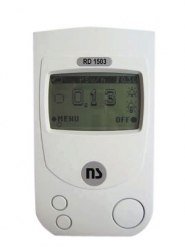
- Before Fukushima price: 85 EUR
- Online stores: 225~
- E-Bay Prices: 230~850 EUR
price increase +270 to +1000%
RADEX RD1706
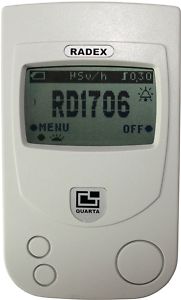
- Online Stores: 259-720 EUR
- E-Bay Prices: 399 ~ 850 EUR
Kvarts DRSB-01

Hard to find simple geiger counter
- Before Fukushima price: 16 EUR
- Manufaturer price: ?
- Online Stores: up to 260 EUR for a used one !
- E-Bay Prices: 65 EUR
price increase +400% to 1625% !
Gamma Scout

- Before Fukushima price: 246 EUR
- Manufaturer price: ?
- Online Stores: 277-365 EUR
- E-Bay Prices: 605 ~ 1400 EUR
price increase +12% to 569% !
Terra-P IP20 / Ecotect MKS-05

- Before Fukushima price: 118 EUR
- Manufaturer price: ?
- Online Stores: 345 ~ 999 EUR
- E-Bay Prices: 550 ~ 780 EUR
price increase +292% to 846% !
Victoreen Model CD V-700
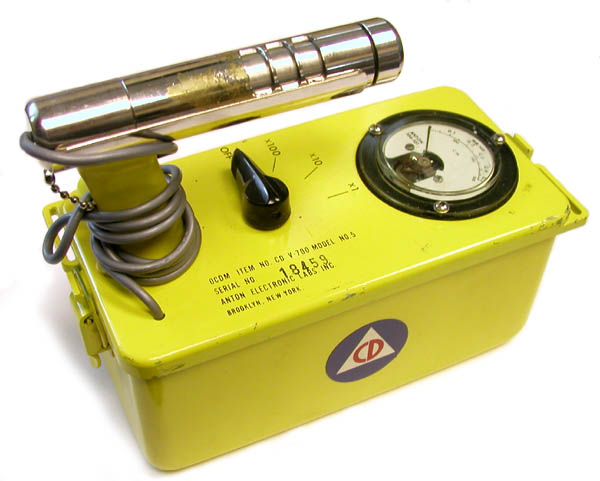
- Before Fukushima price: 35 EUR
- Manufaturer price: cold war antique !
- Online Stores: 210 EUR (as seen on anythingradioactive.com / 185£)
- E-Bay Prices: 70 ~ 256 EUR
price increase +100 to +730%
SOEKS 01М (new)
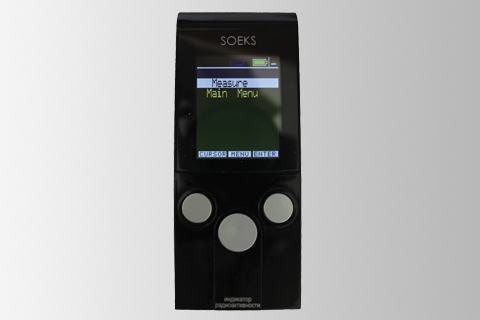
- Before Fukushima price: Unknown ( new model )
- Manufacturer price: 150 EUR ( 6000 roubles / June 2011 )
- Online stores: 230~420 EUR (note soeks.eu is now selling for $399 when still listed $599 in orders’s drop list)
- E-Bay Prices: 230 ~ 400 EUR
price increase +53 to +266%
There’s also some clones on the market like the ukrainian “TARREX” or the Chinese “LK3600”.
Tunnels IPv6 et smtp.free.fr
Chez Free, ils ont a eu la mauvaise idée d’activer l’IPv6 sur les serveurs de mail. Or, tous les clients ne bénéficient pas d’une adresse IPv6 fournie par free.fr (non dégroupés) et passent par un tunnel. Résultat: rejet de tout envoi / refus de relayer le mail envoyé à partir de cette adresse n’appartenant pas à leur réseau.
Pour solutionner ce problème, il est nécessaire de forcer la résolution prioritaire du serveur smtp en ipv4.
Sur un simple desktop:
echo "212.27.48.4 smtp.free.fr" >> /etc/hosts
Ergonomie Voyages SNCF, toujours sur la mauvaise voie
Voyages SNCF, le site préféré des moules a changé de forme, mais pas sur le fond. Il a propagé et cumule toujours nombre d’aberrations ergonomiques. L’usage m’en révèle de nouvelles.
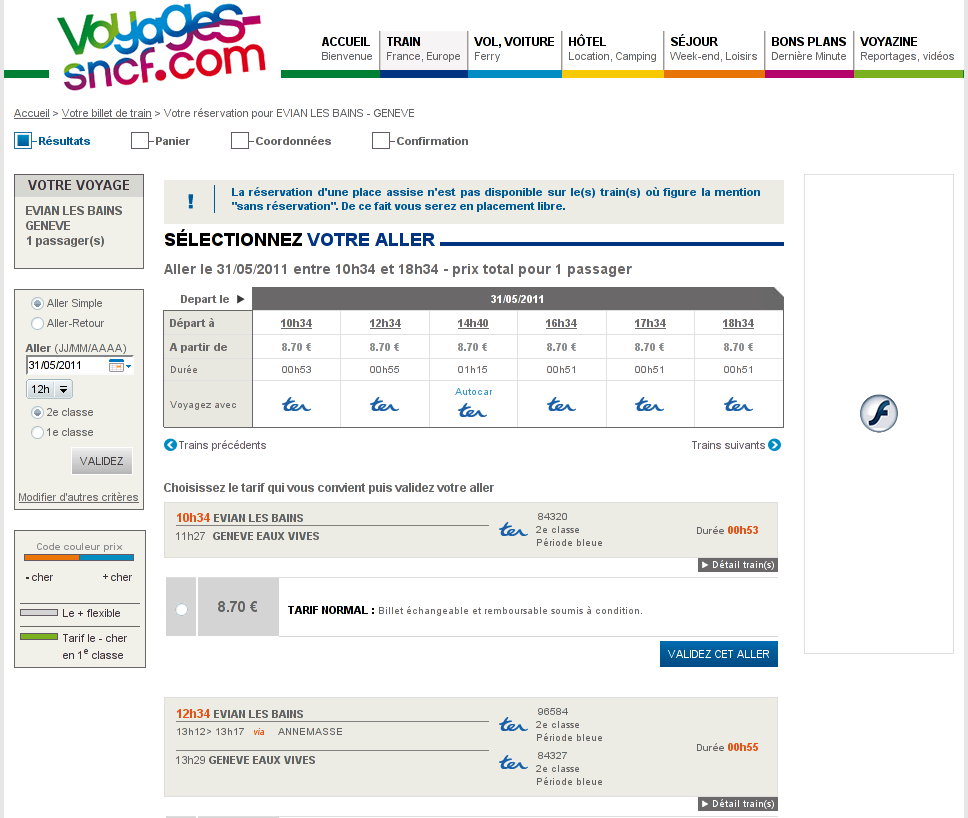
Cliquez sur l'image pour l'agrandir
En dehors:
- du menu sous forme de “CheckBox” qui bien sur n’en ont que l’apparence et pas la fonctionalité,
- de l’avertissement de la “non réservation de places sur les trains le mentionnant” alors que justement tous les trains listés ne proposent pas cette réservation et ne le mentionnent pas,
- de proposer de “modifier d’autres critères” après le bouton de validation (menu de gauche),
penchons nous plutôt sur le code tarifaire visuel mis en place pour ce site de réservations.
Question: “Quel est le code couleur prix (sur le coté gauche) appliqué sur la réservation ci-dessous ?”
- C’est “Orange” (moins cher), comme la couleur Orange associée à l’horaire départ
- C’est un “tarif normal“, comme le mentionne la ligne avec le prix “TARIF NORMAL”
- C’est un tarif “Bleu” (Plus cher), comme le mentionne la ligne “2ème classe, période bleue”
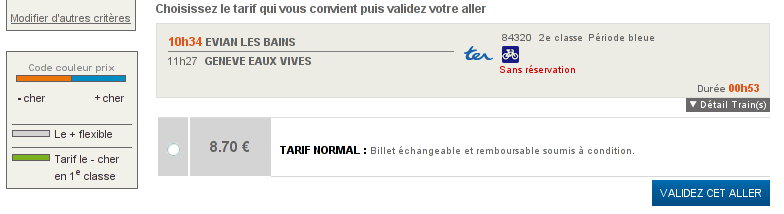 Réponse: L’emplacement effectif du code couleur est en fait le fond “gris”, en fond du prix. (identique au reste de l’encadrement). En fait, il faut décoder “Gris” ( le + flexible ) et Tarif normal. Le “code couleur prix” Orange/Bleu ne s’appliquant pas…
Vous remarquerez par ailleurs que la mention “Sans réservation”, dont l’absence de mention figure dans la liste de grief ci-dessus, figure bien sur cette dernière capture d’écran. En effet, pour connaître tous les trains sans réservation, il fallait cliquer sur “Détail Trains(s)” (pour chaque horaire!). Lien qui en opposition avec les autres, n’est pas affiché comme lien cliquable (sous-ligné)…
Extracting the dialed number from phone record
I ran into a prank call today on youtube, and the authors didn’t care about removing the sound of the dialed number. Comments were arguing that the number could be retrieved. Of course it can: Everyone knows you can simply play that record to redial the number and generating DTMF tones is easy (I wrote my own phone-book application when 15, dialing numbers from my soundblaster card). What about the reverse process then ? Let’s try:
Extracting and locating the DTMF tones within the record. I used Audacity:

According to Wikipedia, here’s the matrix for the DTM Frequencies:
| 1209 Hz | 1336 Hz | 1477 Hz | 1633 Hz | |
|---|---|---|---|---|
| 697 Hz | 1 | 2 | 3 | A |
| 770 Hz | 4 | 5 | 6 | B |
| 852 Hz | 7 | 8 | 9 | C |
| 941 Hz | * | 0 | # | D |
Using the Spectrum analysis module on the selected sample and with the appropriate parameters, you can clearly see the two tones pikes:
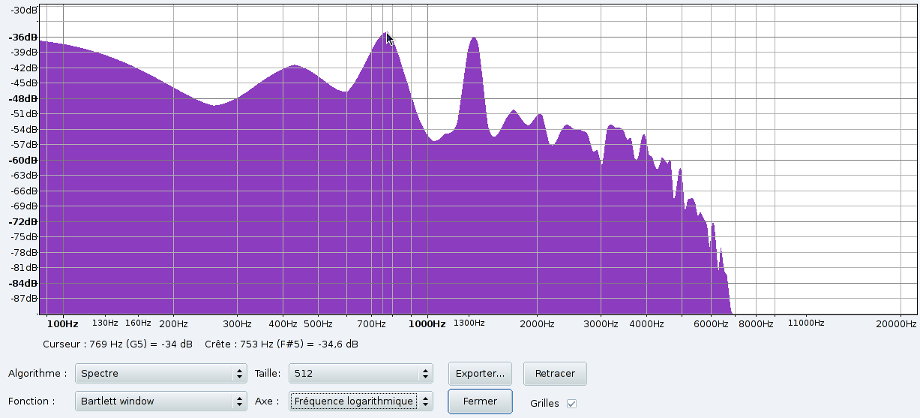
Here, we can identify the 770Hz + 1336Hz dual tones revealing the ‘5’ number. Getting the full number is just a matter of minutes 🙂
I used the Barlett Window with 512 Bytes sample and displayed using the logarithmic scale (as we look for low freq pikes).
Don’t let low priority jobs throttle up your cores
On laptop, low priority background processes can kill your battery really fast even if you’re using the ‘ondemand’ cpu frequency scaling. This remark also applies to saving power on desktop.
With lowest priority, any intensive process will still throttle up your cpu frequency. You usually want it to take only the remaining cpu cycles, not caring about how long this task takes.
You can solve this problem by asking the ondemand cpu governor to ignore tasks with nice values higher than default.
To apply this on every core on the system:
echo 1 > /sys/devices/system/cpu/cpufreq/ondemand/ignore_nice_load
For permanent use, as it’s done though the /sys/, you’ll need to add it to your rc.local or a custom init.d script ( sysctl.conf can’t be used here ).
Sixxs.net tunnel endpoint easy selection
Instead of guessing the closest and fastest endpoint before registering your Sixxs.net IPv6 tunnel,
just run that little script:
https://github.com/fcartegnie/sixxspopelector/raw/master/sixxslist.pl
It will just fetch the latest tunnels list and ping them.
sudo perl sixxslist.pl
Retrieving page
Testing hosts
Pinging bebru01.sixxs.net... 83.71 ms
Pinging bebru02.sixxs.net... 78.50 ms
Pinging brudi01.sixxs.net... 344.92 ms
Pinging dkcph01.sixxs.net... 84.20 ms
Pinging dkcph02.sixxs.net... 500.93 ms
Pinging eetll01.sixxs.net... 105.96 ms
Pinging fihel01.sixxs.net... 176.96 ms
Pinging frmrs01.sixxs.net... 58.09 ms
Pinging decgn01.sixxs.net... 65.25 ms
Pinging dedus01.sixxs.net... 64.78 ms
Pinging deham01.sixxs.net... 75.89 ms
Pinging deham02.sixxs.net... 92.31 ms
Pinging demuc02.sixxs.net... 64.55 ms
Pinging iedub01.sixxs.net... 73.23 ms
Pinging iegwy01.sixxs.net... 136.07 ms
Pinging ittrn01.sixxs.net... 101.98 ms
Pinging lulux01.sixxs.net... 91.69 ms
Pinging nlams04.sixxs.net... 94.15 ms
Pinging nlams05.sixxs.net... 62.22 ms
Pinging nlams01.sixxs.net... 63.98 ms
Pinging nlede01.sixxs.net... 80.49 ms
Pinging nlhaa01.sixxs.net... 63.29 ms
Pinging nzwlg01.sixxs.net... 341.66 ms
Pinging noosl01.sixxs.net... 80.70 ms
Pinging plpoz01.sixxs.net... 82.37 ms
Pinging plwaw01.sixxs.net... 80.93 ms
Pinging ptlis01.sixxs.net... 111.99 ms
Pinging simbx01.sixxs.net... 79.90 ms
Pinging sesto01.sixxs.net... 118.91 ms
Pinging chzrh01.sixxs.net... 88.84 ms
Pinging chzrh02.sixxs.net... 78.59 ms
Pinging gblon02.sixxs.net... 52.97 ms
Pinging usqas01.sixxs.net... 153.30 ms
Pinging usbos01.sixxs.net... 156.51 ms
Pinging uschi02.sixxs.net... 152.75 ms
Pinging uschi03.sixxs.net... 186.11 ms
Pinging usdal01.sixxs.net... 195.37 ms
Pinging usphx01.sixxs.net... 231.69 ms
Pinging demun01.sixxs.net... no fair delay
Pinging nlams02.sixxs.net... no fair delay
Pinging nlams03.sixxs.net... no fair delay
Pinging usatl01.sixxs.net... 500,91 ms
Pinging uschi01.sixxs.net... 500,89 ms
Pinging uslax01.sixxs.net... 500,83 ms
Pinging usewr01.sixxs.net... 500,93 ms
And your winners are:
gblon02.sixxs.net (52,97 ms away)
frmrs01.sixxs.net (58,09 ms away)
nlams05.sixxs.net (62,22 ms away)
nlhaa01.sixxs.net (63,29 ms away)
nlams01.sixxs.net (63,98 ms away)